
Check our CONVERSION quality – Click here to convert a PDF file now on ConvertPDF.Today
Dedicated DESKTOP Converters with Advanced Options
V14 RELEASED! UPGRADES AND SUBSCRIPTIONS ARE AVAILABLE NOW.
PDF2PICTURE
Do more with your PDFs! PDF2PICTURE generates industry-standard vector and image formats. Modify the objects, attributes, layers, and text in your favorite apps. Perfect for Visio and Office.
PDF2CAD
PDF2CAD is unmatched for converting PDF drawings and schematics into standard CAD formats (DWG, DXF and HPGL). It saves hours of redraw time and is guaranteed accurate.
PDF FLY
PDF FLY is the professional’s choice. It’s used in organizations worldwide to convert and edit technical drawings for documentation, product guides and repair manuals. Complete suite.
PDF2APP
Use PDF2APP to copy PDF selections right from your screen and paste them as editable graphics into into your favorite app. Modify colors, scale, orientation, layers, and more!
Plug-ins for popular Windows applications
INSERT PDF
Perfect when you simply need to open a single-page PDF diagram in Visio with no advanced options.
INSERT PDF
Use charts and graphics from PDF files in your presentations. Modify all objects, attributes, and text.
PDFin
Open and edit PDF CAD drawings and schematics. Available for AutoCAD 2002 and higher.
PDF2BRICSCAD
Save hours of redrawing time. Convert PDF into accurate, editable BricsCAD drawings in seconds.
PDF2VECTORWORKS
Advanced PDF editing for VECTORWORKS, including layer support and access to all objects and text.
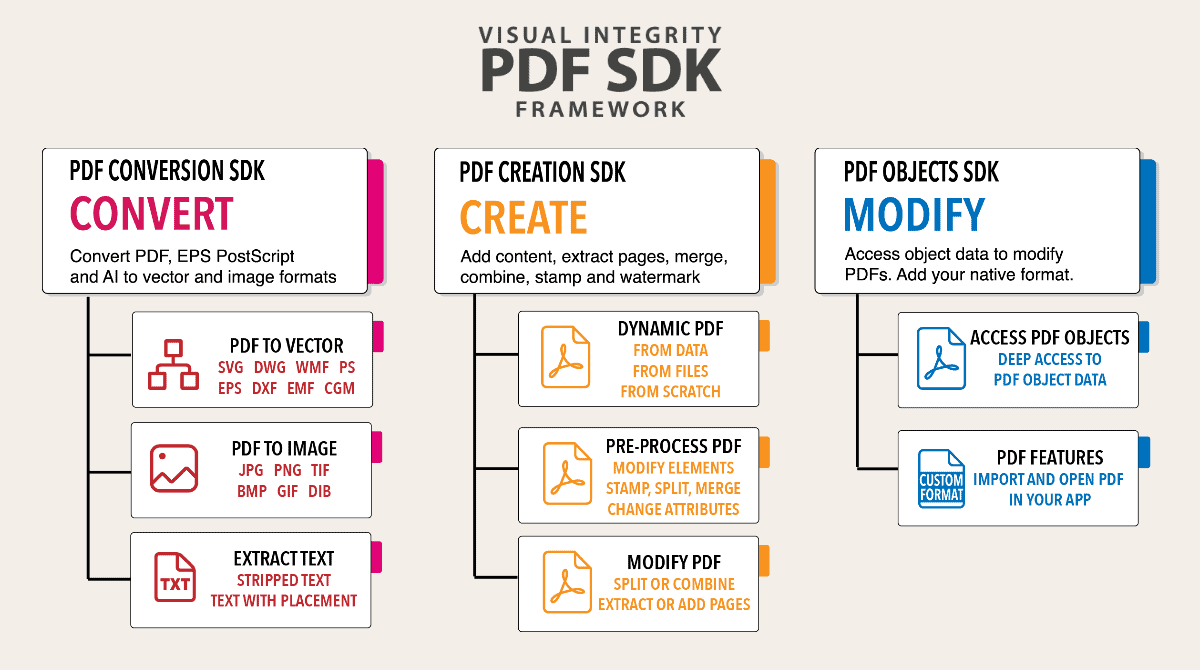
The Leading Specialized PDF SDK
Implement robust PDF features in your app or service with two calls. It’s that easy. We’ve been perfecting our PDF SDK for 30 years – it’s mature, proven and includes over 100 calls for PDF creation, conversion, import, export, layer handling, intelligent object recognition, and more. Windows, Linux and macOS. LEARN MORE

PDF Conversion Server for Command-Line Automation
Automate workflows, document management, and PDF Processing. The cross-platform PDF Conversion Server is a powerful command-line interface for scripting PDF conversion workflows. Available for Windows, Linux, and macOS. LEARN MORE


New! PDF2APP
Breakthrough Technology for Editing PDF Graphics
Use PDF2APP to snip editable vector graphics from an open PDF file on your screen and paste them into your favorite app for illustration, design, publishing, and the Web. Modify colors, line weights, scale, orientation, layers, and more!
Visual Integrity Technology is Trusted and proven globally
